


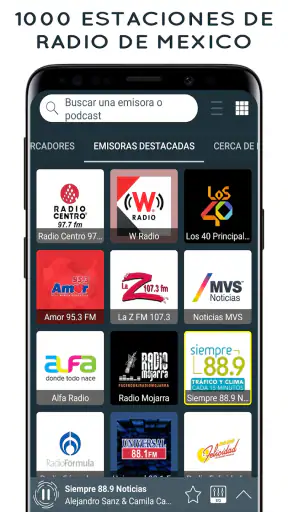

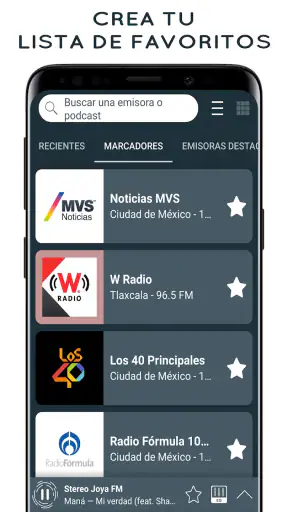
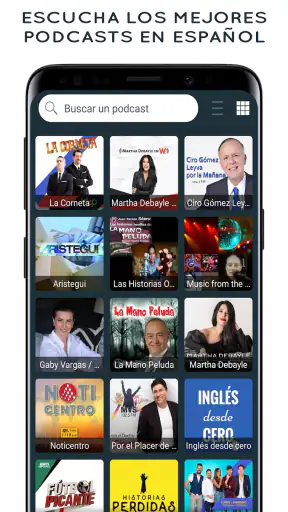
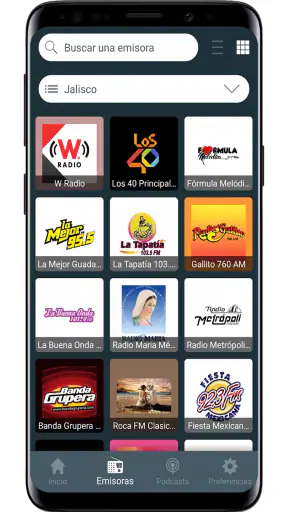
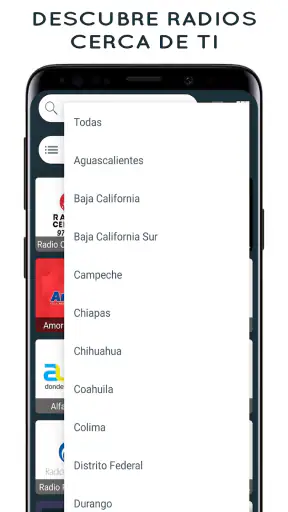
I like radio most when it feels effortless: open an app, choose a station, and let the sound fill the room without building a playlist first. Radio Mexico - online radio is designed around that simple habit. It is a free Music & Audio app from Radio FM Online Free, focused on Mexican radio stations available through an internet connection. In my testing, its appeal is less about extras and more about giving listeners a direct route to familiar live programming.
The app has a strong public track record, with an average rating of 4.8 from around 142 thousand ratings and more than 5 million installs. That does not guarantee that every station or device will behave perfectly, but it does suggest that the basic idea works for a large audience. I would describe it as a practical radio directory rather than a full music service, podcast platform, or replacement for a carefully managed streaming library.
What it feels like to use Radio Mexico day to day
The first thing I noticed is how specific the app’s purpose is. Instead of asking me to search across the entire world of audio, it points its attention toward Mexican FM and AM radio. That focus is useful if I want local language, familiar regional programming, news, talk shows, sports coverage, or music selected by a live station rather than by an algorithm.
A realistic use case is a morning routine. I can open the app while preparing breakfast, select a station, and leave it playing while I move around the house. The experience suits people who prefer a live broadcast’s sense of timing: a presenter speaking between songs, a program progressing in real time, or a station changing its content without requiring me to make decisions every few minutes.
It also works well for someone living outside Mexico who wants a connection to Mexican broadcasting. An internet radio app can be more convenient than trying to find separate station websites or remembering which broadcaster has a working stream. The central value is the concentration of stations in one place, not a collection of personalized recommendations.
That distinction matters. If I want a particular album, offline listening, lyrics, or precise control over the next song, I would choose a music streaming service instead. Radio Mexico is better when I want to discover what a station is airing now and accept the programming choices made by its presenters.
Station choice is the real feature
The app presents access to around 1,500 radio stations from Mexico, covering both FM and AM broadcasting. I see that breadth as helpful, but it also creates a small trade-off: a large directory can take time to explore. The best approach is not to browse randomly for long. I would start with a few stations that match my purpose, test them at different times of day, and keep returning to the ones with reliable audio and programming I actually enjoy.
Live radio is not as predictable as an on-demand catalog. A station that sounds perfect during a music program may feel less relevant later when the schedule changes. That is not necessarily an app defect; it is part of choosing live broadcasting. Still, users who expect every tap to produce a consistent genre or mood should adjust their expectations before installing it.
Another practical point is the internet connection. Because the app streams radio online, the listening experience depends on network quality and on the stream supplied by each station. On a stable home connection, it should fit naturally into background listening. On mobile data or a weak public network, interruptions can become more noticeable, so I would avoid treating it as a guaranteed replacement for downloaded audio during travel.
Privacy and trust deserve a careful look
For an app that plays live audio, I pay attention to what I can see and control rather than assuming more than the product makes clear. The visible purpose is straightforward: selecting and streaming radio stations. That narrow purpose makes the app easier to understand than services built around social profiles, extensive libraries, or personal publishing.
At the same time, I would still review the permission prompts and privacy information shown on my own device before regular use. Permissions can vary by operating system and app release, and I do not treat a simple interface as proof that an app collects nothing. The sensible habit is to read each request when it appears, allow only what is needed for the functions I intend to use, and revisit access later through the phone’s settings.
This is especially important if I install the app on a shared family device or on a phone used for work. I would check whether notifications, network access, or other visible controls fit the way that device is used. I would also avoid entering personal information unless the app clearly explains why it is needed. Radio listening does not require me to turn the experience into a public identity.
The developer shown for the app is Radio FM Online Free, and the current version is 4.2.30. I appreciate having those details available because version information helps me decide whether an update is relevant when troubleshooting. I would keep the app updated through the normal store process, but I would also read the permission changes or update notes presented by the operating system instead of accepting every change automatically.
Where user control is strong, and where it is limited
The strongest form of control here is choice of station. I decide whether to listen to an FM or AM source and whether a station deserves a place in my regular routine. That feels more transparent than an audio service that silently reshapes my listening through recommendations I cannot easily explain.
However, station selection is not the same as full playback control. Live radio generally means accepting the station’s order, interruptions, presenters, advertising, and schedule. If I am working on a task that requires uninterrupted concentration, I may prefer a downloaded playlist or a subscription service with predictable tracks. If I am driving, I would set the station before moving and avoid interacting with the phone while on the road.
I would also pay attention to the app’s visible notification and playback behavior. If notifications become distracting, I would reduce them through the app’s available choices or the operating system’s notification settings. That small adjustment can make a difference because radio is often used in the background; an app that helps me listen without constantly demanding attention is more comfortable.
The app is free to install, which lowers the barrier for trying several stations. It also lists in-app purchases ranging from $0.99 to $34.99 per item. I would check the purchase screen carefully before confirming anything, especially on a device shared with children. A free download should not be confused with a promise that every optional item or experience inside the app has no cost.
The Teen content rating is another reason I would use ordinary household judgment. It does not mean every broadcast will suit every child, because live stations control their own programming and can include subjects, language, or advertising that parents may want to supervise. For younger listeners, I would choose stations together and use the device’s purchase protections rather than handing over unrestricted access.
Small habits that make the app more useful
My first tip is to evaluate stations at the time I actually plan to listen. A station’s morning output may be very different from its evening programming, so a quick test at midday does not tell me everything. This is a more reliable way to build a personal shortlist than judging a station after a single song.
My second tip is to treat mobile listening as a data decision. I would use Wi-Fi for long sessions when possible, particularly if I am exploring many stations. On cellular data, I would keep sessions purposeful and watch the phone’s data controls. This is not a criticism of the app specifically; any live audio stream can consume network data over time.
My third tip is to separate discovery from routine listening. I might spend one short session sampling stations, then use only a few dependable choices during work or household chores. That prevents the large station selection from becoming a source of indecision and makes the app feel much faster in everyday use.
A fourth useful habit is to keep a backup listening plan. If one stream fails, another station may work immediately, but I would not rely on a single live source for an important event or a long journey. Internet radio depends on both the app and the broadcaster’s stream, so flexibility is more realistic than expecting every station to be available every time.
Who should choose it, and who should skip it
I would recommend Radio Mexico to listeners who specifically want Mexican radio in one app, enjoy live programming, and do not need to control every minute of playback. It is also a sensible option for people who want to reconnect with Mexican stations while abroad or who prefer presenters and scheduled shows to algorithmic playlists.
It is less suitable for someone searching for a broad international radio directory, a podcast manager, or a service centered on artists and albums. It may also disappoint listeners who require offline playback, guaranteed uninterrupted audio, or a music experience without station-led advertising and talk segments. In those cases, a conventional on-demand music app or downloaded audio collection would be a better fit.
I would be cautious about recommending it to a young child without supervision. The Teen rating, live nature of broadcasts, and optional purchases make it worth setting up household controls first. For adults, the main responsibility is simpler: review permissions, understand notifications, and make purchases only after checking the confirmation screen.
The minimum operating system is Android 8.0, so compatibility should be comfortable for many older Android phones that still receive regular security support. I would nevertheless check the device’s available storage, battery behavior, and network settings before using any streaming app for long periods. The app itself may be light to operate, but continuous audio still places demands on a phone.
My final view after weighing the trade-offs
The app earns its place through focus, not complexity. It gathers a substantial selection of Mexican FM and AM stations and makes live listening the center of the experience. I find that more useful than a crowded feature list when my actual goal is to hear Mexican radio quickly and casually.
Its limits are equally clear. The quality and consistency of a session can depend on the station, the internet connection, the schedule, and the controls exposed by the particular device. The app cannot turn live broadcasting into an on-demand catalog, and the free entry point still deserves careful attention to optional purchases and visible permissions.
Released on December 1, 2015, it has had time to establish a recognizable purpose, and version 4.2.30 shows that it remains an actively presented product rather than an abandoned download. I would install it when I wanted Mexican stations specifically, test a handful of broadcasts, and keep it only if those stations fit my daily listening.
My cautious verdict is positive: Radio Mexico - online radio is a good free choice for focused Mexican live radio, provided I treat it as streaming broadcast access rather than a complete music library. I would recommend it to a friend who misses Mexican stations or enjoys the unpredictability of live programming. I would point that same friend elsewhere if precise song control, offline listening, international coverage, or a fully predictable audio experience mattered more than discovering what is on the air right now.


